
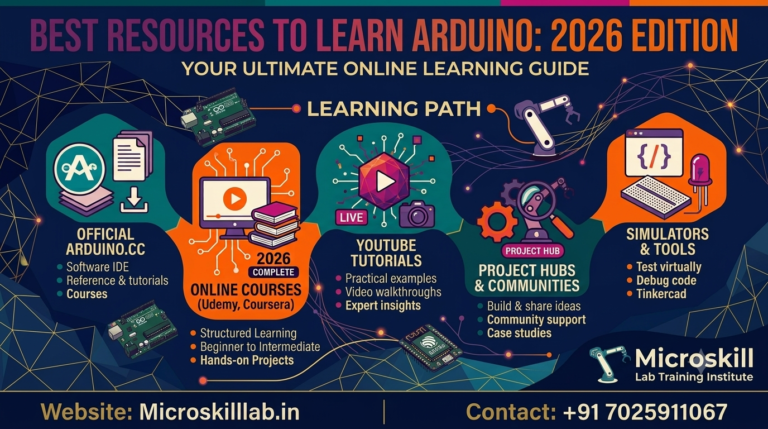
To learn Arduino programming online, start with three free tools: the official Arduino IDE, the Tinkercad Circuits simulator, and structured video tutorials. This guide maps the best resources for self-learners across Bangalore, Kerala, Tamil Nadu, and the rest of India who want to move from zero to real embedded projects. You do not need a hardware kit on day one, and you do not need an engineering degree. Our trainers at Microskill Lab Training Institute have taught these exact pathways to hundreds of beginners. We have organised the tools by cost, difficulty, and outcome so you never waste weeks on the wrong resource.
Learning Arduino programming online means building embedded skills through digital tools instead of a physical classroom. You write code in the Arduino IDE, simulate circuits in the browser, and follow tutorials that teach you how sensors, motors, and microcontrollers talk to each other. This path suits self-learners because every core tool is free and runs on a modest laptop. Thousands of students across Karnataka begin exactly this way before enrolling in a structured programme.
This path fits engineering freshers from ECE, EEE, and CSE backgrounds who want hands-on skills their degree did not cover. It also fits working professionals in Bangalore’s IT corridor who want to move into embedded or IoT roles. Hobbyists and career changers benefit too, since Arduino asks for curiosity rather than prior hardware experience. Our trainers regularly see arts and commerce graduates succeed once they follow a clear order. If you can install software and follow instructions, you can start today.
You begin with the C and C++ style language that Arduino uses, focusing on the setup and loop structure that every sketch follows. Next you learn digital and analog input and output, which lets you read a sensor or blink an LED. From there you move to serial communication, timing, and simple libraries. These fundamentals unlock most beginner projects. For a structured start, explore our Arduino programming course built around the same progression self-learners follow online.
Bangalore remains India’s electronics and IoT hub, and Arduino skills are a recognised entry point into that ecosystem. Firms across Electronic City, Whitefield, and Manyata Tech Park hire for embedded roles that begin with exactly these fundamentals. Learning online lets you build a portfolio before you ever attend an interview. Self-taught candidates who show real projects consistently stand out to hiring managers.
Embedded and IoT hiring in Karnataka has grown alongside the state’s strong electronics manufacturing push. Companies such as Bosch, Siemens, Wipro, and L&T recruit embedded talent in and around Bangalore. Entry-level embedded engineers in the city can earn roughly ₹4–8 LPA, while IoT-focused developers often reach ₹6–14 LPA as they gain experience. (These INR figures are indicative and should be verified against current market data before you rely on them.) Arduino is where many of these careers begin.
India’s mobile-first, high-bandwidth learning culture makes online Arduino study practical and affordable. You can watch tutorials on a phone during a commute and simulate circuits on a laptop at home. This flexibility matters for students in Kerala, Tamil Nadu, Telangana, Andhra Pradesh, and Pondicherry who cannot easily reach a Bangalore campus. Our blended model was designed for exactly this audience. Browse more guides on our embedded systems blog to plan your path.
The single most important free resource is the official Arduino IDE, the environment where you write and upload code. Pair it with a browser-based simulator so you can test logic without buying parts. Together these two tools remove almost every barrier to starting. Our trainers recommend installing both before you watch a single tutorial.
The Arduino IDE is free, open source, and available for Windows, macOS, and Linux. It includes a code editor, a compiler, a serial monitor, and a library manager in one clean window. Beginners should start with the classic IDE 2.x version because its interface is stable and widely documented. Once installed, you can open example sketches and run them immediately. To go deeper on setup and workflow, see our embedded systems programme, which uses the same toolchain.
Tinkercad Circuits lets you build and simulate an Arduino circuit entirely in your browser, with no installation or hardware. You drag components onto a virtual breadboard, write code, and watch the simulation run in real time. This is the safest way to learn wiring before touching a real board. Wokwi is a strong alternative that also simulates the ESP32 and Wi-Fi behaviour. Both platforms are free for the projects most beginners build.
Two boards cover almost everything a beginner needs: the Arduino Uno and the ESP32. The Uno is the classic learning board with a huge tutorial ecosystem. The ESP32 adds Wi-Fi and Bluetooth, which opens the door to IoT. Learning both prepares you for the widest range of projects and job requirements.
The Arduino Uno is the board most tutorials assume, which makes troubleshooting easy for beginners. It has enough pins for LEDs, buttons, sensors, and small motors, so you can complete dozens of starter projects. Its widespread use means almost any error you hit has already been answered online. We recommend the Uno as a first physical board once you outgrow the simulator. It pairs naturally with the fundamentals in our electronics fundamentals course.
The ESP32 is a low-cost board with built-in Wi-Fi and Bluetooth, making it ideal for connected projects. With it you can send sensor data to the cloud, control devices over a network, and build genuine IoT prototypes. Many Bangalore startups build products on this exact chip. Learning the ESP32 early gives your portfolio an IoT edge that hiring managers notice. Our IoT programme builds directly on these skills for learners across South India.
Beyond tools, you need guidance, and the best free tutorials come from official documentation, structured video channels, and active communities. The official Arduino website hosts a language reference and a large library of example projects. YouTube offers full beginner series that walk you from installation to working projects. Communities give you answers when you are stuck at midnight.
Start with the official Arduino documentation, which explains every function with clear examples. Supplement it with a single structured video series rather than scattered clips, so your learning follows a logical order. Written project sites and maker blogs then fill gaps with specific wiring diagrams. The goal is depth over variety. Below is a quick comparison of the main free learning formats.
| Format | Best For | Cost | Limitation |
|---|---|---|---|
| Official docs | Accurate reference | Free | Not a step-by-step course |
| Video tutorials | Visual, guided learning | Free | Quality varies widely |
| Browser simulators | Safe circuit practice | Free | Misses real hardware quirks |
| Community forums | Debugging help | Free | Answers can be inconsistent |
Online communities keep self-learners motivated and unstuck. The Arduino forum, relevant subreddits, and regional maker groups answer questions quickly and share project ideas. Many Bangalore and Kerala learners form small study groups to review each other’s code. Asking good questions is itself a skill that these spaces teach. Community feedback often catches mistakes that solo learners miss for days.
Ready to turn free tutorials into real, job-ready skills? Our trainers guide you from your first blink sketch to a live IoT project, with structured feedback you cannot get from scattered videos. Enrol in our Arduino Programming Course →
The fastest way to learn is to follow a fixed order instead of collecting random resources. Set up your tools, master the basics in simulation, then move to hardware and small projects. A clear sequence prevents the overwhelm that stalls most self-learners. This is the same progression our curriculum follows.
Follow these steps to avoid wasted effort:
Self-study takes you far, but a point comes where feedback accelerates you. If you are stuck on debugging, unsure how to structure larger projects, or aiming for a job, guided training pays off. Our trainers review your code, assign live projects, and connect fundamentals to industry practice. Learners who want microcontroller depth often continue with our advanced embedded tracks after mastering these Arduino foundations. Structure turns scattered practice into employable skill.
With so many resources online, choosing well matters more than choosing many. Judge each resource by cost, structure, recency, and whether it leads to real projects. A free tool that teaches nothing new wastes time, while one good course can save you months. Use a simple checklist before committing to any resource.
Evaluate any Arduino resource against these points:
Free online resources are unbeatable for exploring and getting started. Guided training wins when you need accountability, feedback, and a direct line to a career outcome. The table below compares the two honestly so you can decide what fits your goals and stage.
| Factor | Self-Learning Online | Guided Training |
|---|---|---|
| Cost | Free or very low | Paid |
| Feedback | Community-dependent | Direct from trainers |
| Structure | You build it yourself | Provided and sequenced |
| Best for | Exploring and basics | Job-ready depth |
When you are ready to move from free tools to a structured, project-driven path, our team is happy to help you plan the next step. Reach out through our contact page to discuss which programme fits your goals.
Yes, you can learn the fundamentals entirely for free. The Arduino IDE, the Tinkercad and Wokwi simulators, official documentation, and countless video tutorials cost nothing. You only need to spend money when you decide to buy a physical board and components. Many self-learners reach working projects before spending a rupee. Free resources are more than enough to discover whether Arduino is right for you.
Most motivated beginners grasp the basics in four to six weeks of consistent practice. Reaching confident, portfolio-ready projects usually takes three to six months, depending on your pace and background. Learners with a coding or electronics background often move faster. Structured guidance can meaningfully shorten this timeline. Consistency matters far more than long, occasional study sessions.
No, you do not need any hardware to begin. Browser simulators like Tinkercad and Wokwi let you build and test circuits virtually, which is perfect for the first few weeks. Once you understand the basics, buying an Arduino Uno starter kit is a worthwhile next step. Real hardware teaches lessons that simulation cannot. Most learners buy a board only after they are hooked.
Arduino is an excellent starting point but usually not the whole picture. Employers in Bangalore also value knowledge of microcontrollers like PIC and ARM, communication protocols, and embedded C. Arduino gets you into the mindset and gives you a portfolio, which matters early on. Building on it with structured training strengthens your profile. Think of Arduino as the door, not the entire building.