
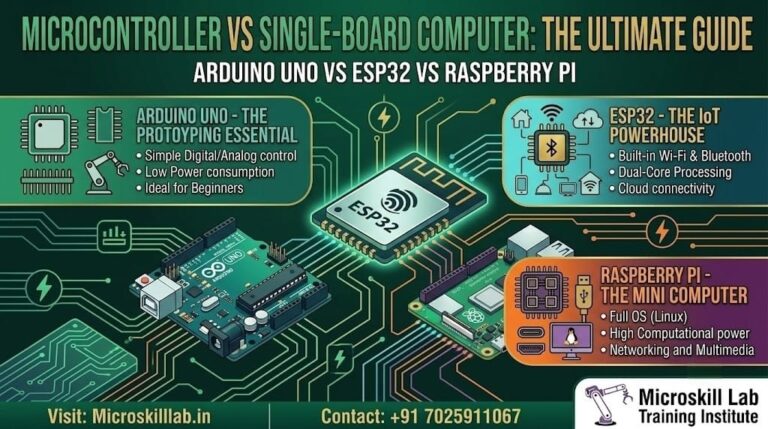
Choosing between Arduino Uno, ESP32, and Raspberry Pi comes down to one question: what do you want to build? The Arduino Uno suits absolute beginners learning electronics and simple automation. The ESP32 is the value pick for Wi-Fi and Bluetooth IoT projects. The Raspberry Pi is a full Linux computer for camera, AI, and networking work. For students across Bangalore and South India starting an embedded systems journey in 2026, the right board depends on your project goals, budget, and how deep you want to go. Our trainers help learners match the board to real career skills.
These three development boards dominate student electronics projects, yet they solve different problems. Understanding the core difference between a microcontroller and a single-board computer saves you money and frustration. Our curriculum introduces each board in the order that builds skill most naturally, starting with fundamentals before moving to connected and computing-heavy projects.
Arduino Uno and ESP32 are microcontrollers: they run one program at a time, directly controlling pins, sensors, and motors. They boot instantly, use very little power, and are perfect for precise real-time control where timing must be exact.
The Raspberry Pi is a single-board computer that runs Linux, multitasks across many programs, and connects to a monitor and keyboard like a desktop PC. This distinction matters because a microcontroller is better for a line-following robot, while a computer is better for a face-recognition camera.
Our trainers explain this split on day one so students never buy the wrong board and waste their limited budget.
For a first project such as blinking LEDs or reading a temperature sensor, the Arduino Uno is ideal because it keeps the electronics simple and visible.
For sending sensor data to a mobile app or cloud dashboard over Wi-Fi, the ESP32 wins on both price and built-in features.
For projects involving image processing, databases, or a local web dashboard, the Raspberry Pi is the natural choice thanks to its Linux capabilities.
Students in our Arduino Programming and Projects Course begin with the Uno before scaling up to connected and computing projects. This progression mirrors how Bangalore product companies structure their own prototyping workflows.
Bangalore is India’s electronics and IoT hub, and employers across Electronic City, Whitefield, and Manyata Tech Park expect graduates to demonstrate practical board-level skills. Knowing which platform fits a problem is a signal of real engineering judgement.
Our curriculum builds this judgement through live projects rather than theory alone, which is what hiring managers in Karnataka’s IT and hardware sector consistently look for.
Product companies and startups hiring embedded freshers want candidates who can wire a circuit, write firmware, and debug hardware under real conditions.
Familiarity with the Arduino IDE, sensor interfacing, and communication protocols such as I2C, SPI, and UART separates job-ready students from certificate-only applicants.
Bangalore’s dense cluster of hardware startups and R&D centres means practical board skills are tested directly in interviews.
Embedded engineers in Bangalore earn roughly ₹4–10 LPA at entry level as of 2026, with IoT and Linux specialists commanding more. These figures are indicative and should be verified against current market data before publication.
Our Embedded Systems Pro Programme is built around these competencies.
Demand for embedded and IoT talent extends beyond Bangalore into Kerala, Tamil Nadu, Telangana, Andhra Pradesh, and Puducherry, where electronics manufacturing and product startups continue expanding.
Chennai and Hyderabad in particular host growing hardware and IoT ecosystems that recruit South Indian graduates.
Roles such as embedded developer, IoT engineer, firmware tester, hardware validation engineer, and embedded Linux developer regularly appear across these states.
Salaries scale with hands-on skill and protocol knowledge rather than degrees alone, so a strong project portfolio pays off directly. We designed our capstone projects so learners graduate with a portfolio that demonstrates this practical capability to recruiters.
A direct comparison helps you see the trade-offs before committing to a platform. Each board has clear strengths and clear limitations, and no single board wins every category.
Reading the specifications alongside your own project goal is the fastest way to decide. Our trainers use this same framework when guiding students toward their first purchase.
| Feature | Arduino Uno | ESP32 | Raspberry Pi |
|---|---|---|---|
| Type | Microcontroller board | Microcontroller board | Single-board computer |
| Typical Processor | 8-bit ATmega328P | 32-bit dual-core microcontroller | 64-bit ARM application processor |
| Operating System | None, bare-metal firmware | None, bare-metal firmware or RTOS | Linux operating system |
| Wi-Fi | Not built-in | Built-in | Built-in on most current models |
| Bluetooth | Not built-in | Built-in | Built-in on most current models |
| Boot Time | Almost instant | Almost instant | Requires operating-system boot time |
| Real-Time Control | Very suitable | Very suitable | Less deterministic under standard Linux |
| Power Consumption | Very low | Low | Higher |
| Programming | Arduino IDE using C/C++ | Arduino IDE, ESP-IDF, or MicroPython | Python, C, C++, JavaScript, and other languages |
| Best For | Learning electronics and simple automation | IoT, wireless sensors, and connected devices | Linux, cameras, AI, networking, and web applications |
| Approximate Cost Level | Low | Low | Higher |
| Beginner Learning Curve | Very easy | Moderate | Moderate to advanced |
If you are completely new, start by looking at the Best For row and match it to your project idea.
Notice that Arduino Uno and ESP32 both support the Arduino IDE, so the coding skills you build on one transfer easily to the other.
Raspberry Pi requires learning Linux basics, file systems, networking, and command-line tools, which is valuable but represents a larger first step.
The power-consumption row also matters for battery-operated projects, where Arduino Uno and ESP32 usually outperform Raspberry Pi.
Our Internet of Things Programme bridges the ESP32-to-cloud gap that many self-learners struggle with.
Arduino Uno is usually the best starting point for complete beginners because its hardware is simple, visible, and well documented.
It allows students to focus on basic circuit behaviour without immediately dealing with Wi-Fi, Bluetooth, Linux, networking, or multitasking.
These limitations are not disadvantages when learning. They force beginners to focus on fundamental embedded principles before adding complexity.
ESP32 is the natural next step after Arduino Uno because it preserves a familiar Arduino-style development workflow while adding Wi-Fi, Bluetooth, more memory, and more processing power.
Raspberry Pi is fundamentally different from Arduino Uno and ESP32 because it is a complete computer rather than a simple microcontroller.
It typically runs Linux from a microSD card and supports multitasking, file storage, networking, graphical interfaces, cameras, databases, and advanced programming libraries.
The software you use shapes how quickly you can build and debug. Arduino IDE is the friendliest starting point and supports both Arduino Uno and ESP32 through board-manager packages.
Our trainers teach the Arduino IDE first because its skills transfer across many student projects.
The Arduino IDE allows you to write code, verify it, and upload it to a board using a simple workflow.
It includes:
Adding ESP32 support requires installing the official ESP32 board package through the Boards Manager. After that, the same Arduino IDE can program both boards.
The Serial Monitor provides a simple way to observe sensor values and program status during debugging.
We walk learners through this setup during the first practical session of our Arduino Programming and Projects Course.
As projects become more advanced, students may move to:
Raspberry Pi introduces Linux and command-line tools, which are valuable across embedded and IoT roles in Bangalore.
Our Embedded Linux Development Course helps students make this transition with structured guidance rather than trial and error.
Ready to build real projects instead of only reading about boards? Get hands-on with Arduino IDE, ESP32, and live IoT projects guided by trainers with practical embedded experience. Start with fundamentals and grow into advanced work at your own pace. Explore our Embedded Systems Pro Programme →
The best board is the one that matches your immediate learning goal, not the most powerful one available. Beginners who choose the most advanced option often stall because the learning curve becomes too steep.
Our trainers help each student select a starting point that provides an early win and steady progress.
| Project | Recommended Board | Reason |
|---|---|---|
| Blinking LED | Arduino Uno | Simplest platform for GPIO fundamentals |
| Temperature Sensor | Arduino Uno or ESP32 | Both can read basic sensors easily |
| Wi-Fi Weather Station | ESP32 | Built-in Wi-Fi and low power consumption |
| Bluetooth-Controlled Robot | ESP32 | Built-in Bluetooth removes extra modules |
| Face-Recognition Camera | Raspberry Pi | Requires Linux, camera support, and greater processing power |
| Home Web Server | Raspberry Pi | Supports full web frameworks and databases |
| Battery-Powered Remote Sensor | ESP32 | Deep sleep and wireless connectivity |
| Line-Following Robot | Arduino Uno or ESP32 | Requires fast and predictable motor control |
| Industrial IoT Gateway | Raspberry Pi with ESP32 Nodes | Combines Linux networking with distributed sensors |
| AI Object Detector | Raspberry Pi | Needs high-level libraries and more computing power |
Advanced systems often combine microcontrollers and single-board computers rather than choosing only one.
In a combined system:
This architecture is useful for robotics, automation, and test systems.
ESP32 can act as a remote wireless sensor node while Raspberry Pi acts as a local gateway.
For example:
This structure reflects real IoT systems used in buildings, agriculture, factories, and energy-monitoring applications.
A sensible learning sequence is Arduino Uno first, ESP32 second, and Raspberry Pi third.
This path adds one new layer of complexity at a time:
Each stage adds a new capability without discarding what you have already learned. Recruiters value this visible progression more than a single isolated certificate.
Our PCB Designing Programme and embedded systems tracks connect these skills into one route from a first LED project to a placement-ready portfolio.
Most early frustration comes from avoidable mistakes rather than difficult concepts. Knowing the common pitfalls in advance saves time and protects hardware.
ESP32 operates at 3.3 V logic, unlike the 5 V Arduino Uno. Connecting a 5 V sensor output directly to an ESP32 pin can cause permanent damage.
Using neat breadboard wiring and checking every connection before applying power prevents many failures. Reading a datasheet before wiring is a habit we build early in every batch.
A better approach is to divide a project into milestones and test each part before adding the next feature.
Starting small and iterating is the fastest route to real capability. Our Electronics Fundamentals Programme introduces these disciplined habits from the first class.
Arduino Uno demonstrates fundamental hardware understanding. ESP32 demonstrates wireless IoT ability. Raspberry Pi demonstrates Linux, networking, and higher-level computing skills.
A portfolio that includes projects on all three platforms shows employers that you understand both low-level hardware control and high-level connected computing.
To discuss the most suitable route for your experience and career goals, contact our training team.
Both support the Arduino IDE, so both can be beginner-friendly. Arduino Uno is usually the better first board because it keeps the focus on wiring, sensors, and basic programming. ESP32 is the better next step when you need Wi-Fi or Bluetooth.
Not always, because they serve different purposes. Raspberry Pi is a full computer and is ideal for cameras, AI, networking, and web applications. Arduino Uno is better for precise, low-power, real-time control of sensors and motors. Many advanced projects use both together.
ESP32 provides the best value for many student IoT projects because Wi-Fi and Bluetooth are built in at a low cost. It can connect sensors directly to cloud dashboards without requiring an additional communication module.
Arduino Uno or ESP32 is usually best for basic robots that need real-time motor and sensor control. Raspberry Pi is useful when the robot also needs image processing, AI, complex navigation, or a camera.
Yes. Install the ESP32 board package through the Arduino IDE Boards Manager. After installation, most Arduino programming concepts and libraries transfer directly.
Yes. Basic Linux commands, file management, networking, package installation, and terminal usage are essential for effective Raspberry Pi development.
Arduino Uno and ESP32 generally use much less power than Raspberry Pi. ESP32 deep-sleep mode makes it particularly suitable for battery-powered wireless sensors.
Not necessarily. Start with the board that matches your immediate project. Arduino Uno is normally the best first purchase, followed by ESP32 for IoT and Raspberry Pi for Linux, camera, or AI applications.