
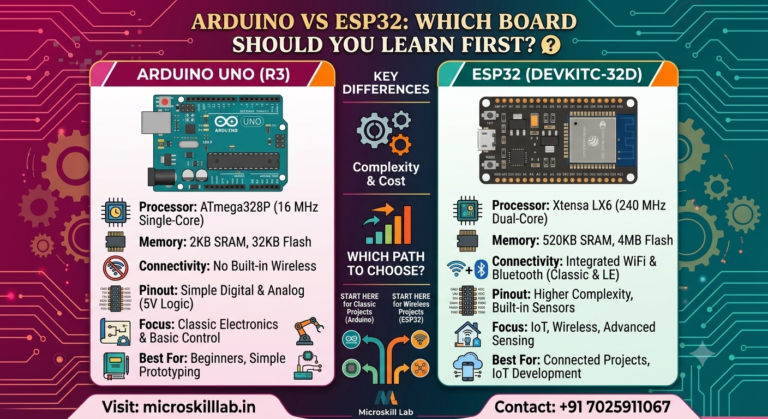
Arduino vs ESP32 comes down to one core trade-off: Arduino Uno is the simpler, more beginner-friendly board for learning electronics fundamentals, while ESP32 adds built-in Wi-Fi and Bluetooth, faster processing, and far more memory for real IoT projects. For engineering students and hobbyists in Bangalore starting out in embedded systems, the right choice depends on whether you’re learning the basics or building a connected product. This guide breaks down the hardware, wireless capabilities, and programming differences so you can pick the board that matches your goals.
Arduino Uno is an 8-bit microcontroller board built around the ATmega328P chip, designed primarily for learning electronics and simple automation projects. It runs at 16 MHz, has 2 KB of RAM, and communicates over USB or basic wired interfaces. It has no built-in wireless hardware.
ESP32 is a 32-bit system-on-chip (SoC) with a dual-core processor running up to 240 MHz, 520 KB of SRAM, and integrated Wi-Fi plus Bluetooth radios. It was designed from the ground up for connected devices, not just standalone circuits.
Arduino Uno suits learners who are new to electronics and want to understand digital pins, analog sensors, and basic C/C++ logic without the added complexity of network protocols. It is the standard starting point in our Arduino Programming and Projects Course at Microskill Lab Training Institute.
ESP32 is built for students moving toward IoT: home automation, remote sensor monitoring, and cloud-connected dashboards. Bangalore’s electronics manufacturing and IT-hardware clusters, including firms operating out of Electronic City and Whitefield, increasingly look for candidates comfortable with ESP32-based prototyping.
Karnataka’s electronics and embedded systems sector has grown steadily as companies expand IoT and smart-device product lines out of Bangalore. Understanding when to use Arduino versus ESP32 is now a practical hiring filter for embedded and IoT engineering roles.
Entry-level embedded and IoT engineers in Bangalore typically earn between ₹4–8 LPA, with IoT-focused roles at product companies and MNCs like Bosch and Siemens trending toward the higher end once candidates show working prototypes. These salary figures should be verified against current market data before publication.
Employers routinely ask candidates to demonstrate a wireless sensor project during interviews.
Recruiters rarely expect Arduino-only expertise anymore. Job descriptions for embedded and IoT trainee roles across Bangalore increasingly list ESP32, Wi-Fi provisioning, and MQTT or cloud dashboard experience as preferred skills, alongside foundational Arduino and C programming.
A portfolio with both an Arduino-based project, such as a sensor-driven alarm, and an ESP32-based project, such as a Wi-Fi weather station, signals range.
This is exactly the structure we follow in our Embedded Systems Pro Programme, where learners build progressively from wired circuits to wireless IoT systems.
The clearest way to understand Arduino vs ESP32 is side by side. ESP32 outperforms Arduino Uno on nearly every raw specification, but Arduino Uno remains easier to debug for absolute beginners because of its simpler architecture.
| Feature | Arduino Uno | ESP32 |
|---|---|---|
| Processor | 8-bit ATmega328P, 16 MHz | Dual-core 32-bit, up to 240 MHz |
| RAM | 2 KB | 520 KB |
| Flash Storage | 32 KB | 4 MB (typical) |
| Operating Voltage | 5V | 3.3V |
| Digital I/O Pins | 14 | 34 (varies by board) |
| Wi-Fi | Not built-in | Built-in |
| Bluetooth | Not built-in | Built-in (Classic + BLE) |
| Analog Pins | 6 | 18 ADC channels |
| Typical Price Range | Lower | Slightly higher |
| Ideal Use Case | Learning basics and simple automation | IoT, wireless, and data-heavy projects |
Arduino Uno’s 5V logic makes it more forgiving for beginners connecting sensors with mismatched voltage tolerances. ESP32 runs at 3.3V, which means learners need to check sensor compatibility carefully or use logic-level converters, a detail we cover early in our lab sessions.
ESP32’s significantly larger RAM and flash storage matter once a project involves handling sensor data, running a small web server, or connecting to cloud platforms. Arduino Uno’s 2 KB RAM limits how much data-heavy processing it can realistically manage.
This is where ESP32 clearly separates from Arduino Uno. Wireless communication is built directly into the ESP32 chip, which is why it has become the default board for IoT coursework and hobbyist projects across India.
ESP32 supports 802.11 b/g/n Wi-Fi and both Bluetooth Classic and Bluetooth Low Energy (BLE), enabling projects like remote sensor dashboards, smart switches, and mobile-app-controlled devices without any extra hardware.
Arduino Uno requires an external shield or module, such as an ESP8266 add-on or a separate Bluetooth module, to achieve similar connectivity. This adds cost, wiring complexity, and additional code for serial communication between boards.
Both boards can be programmed using the Arduino IDE, so time invested in Arduino Uno is not wasted when moving to ESP32. The syntax, structure, and core functions, including setup() and loop(), remain the same.
The main difference is board-specific library support. ESP32 requires installing the ESP32 board package inside the Arduino IDE and using additional libraries for Wi-Fi and Bluetooth functionality.
Common ESP32 libraries include:
WiFi.hArduino Uno has a gentler learning curve because there is no networking code to manage. Students typically become comfortable with digital and analog input/output within the first few sessions of our Arduino Programming and Projects Course.
ESP32 introduces additional concepts including:
We recommend learners complete Arduino fundamentals first, which is how we structure progression in our classroom batches.
Ready to build real IoT projects instead of just reading about them? Get hands-on with both Arduino and ESP32 under trainer guidance, with lab access and project support included in every batch. Enrol in the Embedded Systems Pro Programme →
The right board depends on what you are building, not which one is better overall. Arduino Uno and ESP32 solve different problems, and knowing which board to use is itself an important embedded systems skill.
Choose Arduino Uno for simple automation, learning circuit basics, or any project without a networking requirement. Choose ESP32 whenever your project needs to send data somewhere, connect to a phone, or operate wirelessly.
Some embedded systems use one board for simple sensor-reading tasks and another for wireless communication. For example, an Arduino Uno may collect data from sensors and send it through serial communication to an ESP32 for cloud upload.
This layered approach is common in industrial and home-automation prototypes built by students in our labs, and it reflects how larger embedded systems divide responsibilities between controllers.
At Microskill Lab Training Institute, we do not teach Arduino and ESP32 as isolated technologies. Our curriculum progresses from circuit fundamentals to wired microcontroller projects and then to complete wireless IoT deployment.
Our labs include both Arduino Uno and ESP32 boards, giving learners practical experience rather than theory alone.
We provide classroom training in Bangalore with practical lab access, along with blended learning options for students and working professionals.
Each batch includes:
Students who complete our Electronics Fundamentals Programme before Arduino and ESP32 modules generally progress faster through wireless and IoT concepts.
To check current batch schedules and find the right learning path, contact our admissions team.
Not necessarily. Arduino Uno is usually the better starting point because it keeps learning focused on circuits and code without adding Wi-Fi and Bluetooth configuration.
Basic Arduino sketches often run on ESP32 with minor changes because both boards support the Arduino IDE. Code involving Wi-Fi, Bluetooth, or board-specific pins must be adjusted.
ESP32 is generally the stronger choice for final-year IoT projects because it supports wireless communication, cloud data transfer, and remote monitoring without additional modules.
It is strongly recommended for complete beginners. Arduino Uno teaches the programming and circuit fundamentals that make ESP32’s added networking complexity easier to understand.
ESP32 boards are usually priced slightly higher, but they remove the need for separate Wi-Fi and Bluetooth modules, which can make them more economical for IoT projects.
Relevant roles include embedded systems trainee, IoT developer, firmware intern, hardware prototyping engineer, product design intern, and embedded test engineer across Bangalore’s Electronic City, Whitefield, and Manyata Tech Park technology clusters.