
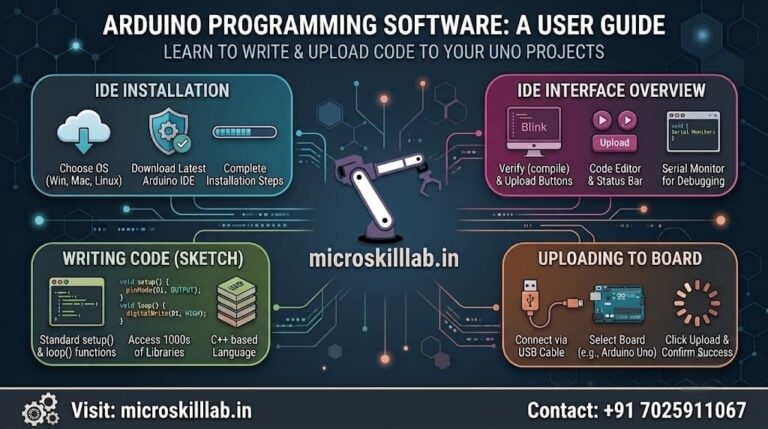
Arduino programming software is the toolchain you install on your computer to write, compile, and upload code to an Arduino board. For most beginners in Bangalore and across India, the official Arduino IDE remains the fastest starting point, while PlatformIO suits learners who want professional debugging and multi-board support. We train students and working developers across Karnataka, Kerala, Tamil Nadu, Telangana, Andhra Pradesh, and Puducherry, and we consistently recommend starting with the Arduino IDE before graduating to heavier tools. Your board choice, usually an Arduino Uno, matters far less than the editor you learn to think inside.
Arduino programming software sits between the code you type and the microcontroller that runs it. Understanding this pipeline early saves beginners weeks of confusion when uploads fail or libraries misbehave. We start every classroom session in Bangalore by walking learners through exactly what happens after they press the Upload button. That mental model carries into every embedded systems role they will ever hold. Without it, debugging becomes guesswork rather than reasoning.
You write a sketch in C++ with Arduino’s simplified library wrappers layered on top. The software then preprocesses your file, compiles it with the GCC toolchain for your target chip, and links it against the core libraries for your board. Finally, a bootloader on the Arduino Uno receives the compiled binary over USB and writes it into flash memory. Every tool in this article performs those same four steps; they differ only in how much control and visibility they hand you along the way.
Beginners often assume any text editor will do, and technically that is true, but the friction is real. A good environment catches syntax errors before compilation, autocompletes library functions you have not memorised, and surfaces serial output without extra setup.
Our curriculum introduces the Arduino IDE first precisely because it removes that friction, letting you concentrate on electronics rather than on fighting your tooling. Learners who begin with our Arduino Programming and Projects Course reach their first working sensor build within the opening sessions.
The Arduino IDE is the official environment maintained by Arduino itself, and it remains the most widely used entry point worldwide. For students at engineering colleges across Karnataka and Tamil Nadu, it is almost always the first embedded toolchain they touch. We keep it central to our beginner modules because it removes almost every barrier between a new learner and a running program.
The Arduino IDE download is free from the official Arduino website, with builds available for Windows, macOS, and Linux. Installation bundles the compiler, board definitions, and USB drivers you need, so a fresh machine goes from empty to uploading code in a single sitting.
On Windows, you may still need to confirm the driver installation prompt, and on Linux you will typically add your user to the dialout group for serial-port access. Once installed, you select your board and port from the Tools menu, open the Blink example, and press Upload to confirm your entire toolchain works.
Arduino IDE 2.x introduced a better editor with autocomplete, a sidebar Library Manager, and a basic debugger for supported boards. The Serial Monitor and Serial Plotter are built in, covering most of what a beginner needs for debugging simple sketches.
However, the IDE remains limited for large projects, offers no meaningful built-in version-control integration, and handles multi-file architectures awkwardly. We teach it as a launchpad rather than a permanent home, and our trainers are explicit with learners about where its ceiling sits.
PlatformIO is an extension that turns Visual Studio Code into a complete embedded development environment. It is widely used by professional firmware engineers in Bangalore and is where our intermediate learners migrate once their fundamentals are solid. The learning curve is real, but the payoff is a workflow that scales from a single Arduino Uno to commercial embedded hardware projects.
PlatformIO manages dependencies through a project configuration file, so your libraries and board settings are versioned alongside your code rather than stored in a global folder. It supports hundreds of development boards and frameworks from one installation, which matters when your projects expand beyond AVR into ESP32 or STM32 platforms.
It also supports genuine step-through debugging on compatible hardware, allowing you to set breakpoints, inspect variables, and follow program execution instead of relying entirely on print statements.
Combined with Visual Studio Code features such as Git integration, code navigation, refactoring, and workspace management, PlatformIO feels much closer to professional software engineering than basic sketch editing.
We recommend moving to PlatformIO once you encounter either of these situations:
Moving too early can be counterproductive because PlatformIO’s configuration structure adds complexity that a first-week beginner does not need.
Students progressing into our Embedded Systems Pro Programme use PlatformIO during advanced projects because it reflects the development environments they are likely to encounter in industry.
Choosing between development environments is easier when you compare the trade-offs directly. The right answer depends on where you are in your learning journey, not which tool is technically the most powerful.
| Feature | Arduino IDE 2.x | PlatformIO with VS Code | Arduino Cloud Editor |
|---|---|---|---|
| Setup Difficulty | Very Low | Moderate | Very Low |
| Cost | Free | Free Core | Free Tier and Paid Plans |
| Offline Use | Yes | Yes | Limited |
| Debugging Depth | Basic | Full Step-Through Debugging | Basic |
| Multi-Board Support | Good | Excellent | Good |
| Version Control | No Built-In Git Integration | Full Git Integration | Basic Revisions |
| Best Suited To | Absolute Beginners | Serious Learners and Professionals | Chromebook and Shared-Lab Users |
Beyond Arduino IDE and PlatformIO, several tools solve specific learning and development needs.
Students who want to begin without physical hardware can first practise through simulation and then move into our Arduino Programming and Projects Course for real board-level experience.
Debugging is where many self-taught learners stall, and it is one of the most important capabilities Bangalore hiring managers examine during technical interviews. Writing code that works is one skill; diagnosing code that does not work is considerably harder.
We build debugging exercises into every module because systematic fault-finding is what separates a hobbyist from an employable embedded engineer.
The Serial Monitor is your first and most frequently used diagnostic tool on an Arduino Uno. You print variable values at key points, watch the output, and work backward from where the actual behaviour differs from what you expected.
The Serial Plotter extends this approach by displaying numeric values as a graph over time, which is useful when tuning sensor thresholds, tracking temperature changes, or observing how a control loop behaves.
This debugging method may be simple, but it is highly effective and remains useful even for experienced developers working on constrained hardware.
The key discipline is to:
Once Serial Monitor output is no longer enough, hardware debugging provides deeper visibility. Using PlatformIO and a compatible debugging probe, you can halt program execution at a breakpoint, inspect variables in memory, and execute instructions one line at a time.
This becomes essential for diagnosing:
Our Electronics Fundamentals Programme combines software debugging with multimeter, oscilloscope, and logic-analyser practice because many apparent firmware problems are actually caused by hardware faults.
Ready to move beyond blinking an LED? Build real embedded projects with structured guidance from trainers who have worked on production firmware. Our hands-on Bangalore batches take you from your first Arduino IDE upload to a portfolio-ready capstone project. Enrol in the Arduino Programming Course →
Arduino is a teaching platform, not a complete career destination. However, it remains an excellent entry point into embedded systems roles, which continue to be in demand across Bangalore’s hardware and electronics ecosystem.
Many learners use Arduino fluency as the first credible skill on a résumé that later grows to include Embedded C, ARM microcontrollers, RTOS, PCB design, and Embedded Linux.
Bangalore contains a substantial share of India’s embedded engineering work, covering automotive electronics, industrial automation, consumer electronics, semiconductor development, and IoT products.
Hardware and firmware teams are concentrated around:
Entry-level embedded roles in Bangalore are commonly advertised in the range of ₹3.5–6 LPA, with experienced firmware engineers earning considerably higher salaries. These figures are indicative and should be verified against current market conditions before publication.
Employers do not normally hire candidates simply because they know how to use Arduino IDE. They hire for the engineering skills demonstrated through Arduino projects.
Those skills include:
Learners aiming for connected-device roles frequently continue into our Internet of Things Programme, which adds networking, cloud integration, MQTT, and wireless communication to their embedded systems foundation.
There is no single development environment that is perfect for every learner. The best choice depends on your current skill level and the complexity of the project you are building.
The most common mistake beginners make is adopting an advanced professional tool before they understand the basic compile-and-upload process.
The development environment matters less than consistent practice. Learners who build one small project every week for six months generally progress much faster than learners who spend the same period comparing editors without completing anything.
Our curriculum is structured around progressive projects, with each build introducing one new concept while reinforcing everything already learned.
If you are unsure which course or development environment fits your background, contact our Bangalore training team and we will guide you toward the right starting point.
Yes. Arduino IDE is free and open-source software available for Windows, macOS, and Linux. PlatformIO’s core features are also free.
No. Simulators such as Tinkercad and Wokwi allow you to write and test Arduino sketches without hardware. However, real hardware is recommended because it teaches wiring faults, power problems, and timing behaviour that simulation cannot fully reproduce.
Usually not. PlatformIO adds configuration and project-management complexity that can distract beginners from learning electronics and programming fundamentals. Moving to PlatformIO is much easier after you understand the Arduino IDE workflow.
Yes. Arduino sketches are written in C++ with a simplified library layer and preprocessing conveniences. The C and C++ skills you develop through Arduino transfer directly into professional embedded systems work.
Rarely on its own. Arduino provides a legitimate foundation, but employers also look for interrupt handling, timers, communication protocols, memory management, register-level programming, and systematic debugging ability.